System Architecture
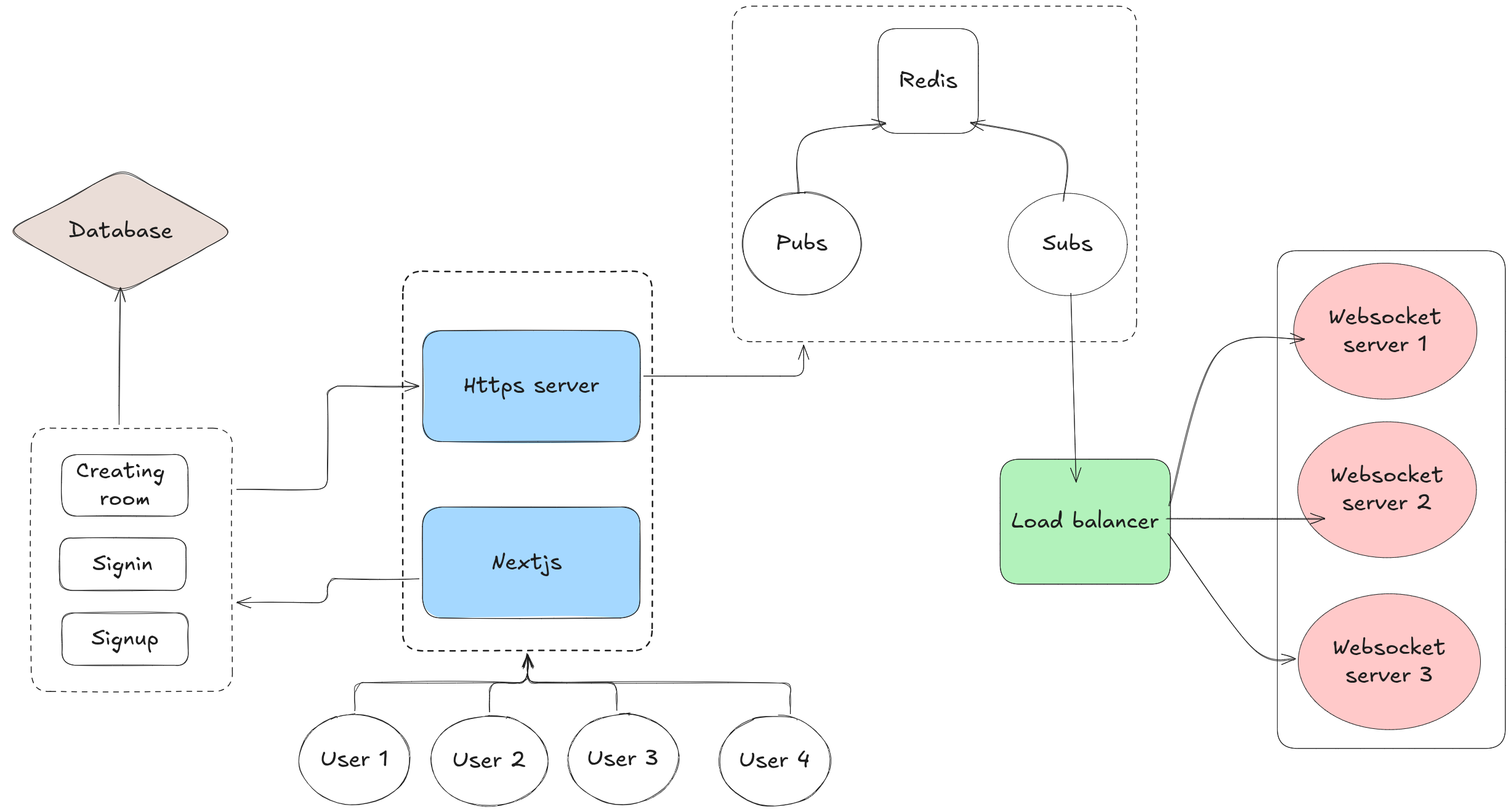
The system follows a monorepo architecture with two apps — a Next.js 15 frontend handling UI, authentication and API routes, and a standalone WebSocket server for real-time canvas collaboration. Both apps share a PostgreSQL database via Prisma ORM, and communicate through WebSocket connections for live drawing synchronization.
Core Components & Implementation
Monorepo Structure
Built with Turborepo + pnpm workspaces for efficient monorepo management.
Apps
apps/web:3000Next.js 15 frontend + API routes
apps/ws-backend:8080WebSocket server for real-time collab
Shared Packages
@repo/prismaPrisma client, schema & migrations
@repo/zodShared Zod validation schemas
@repo/typescript-configShared TypeScript configs
@repo/eslint-configShared ESLint configs
@repo/uiShared UI components
API Endpoints
| Method | Route | Auth | Description |
|---|---|---|---|
| POST | /api/signup | No | Create a new user |
| POST | /api/signin | No | Authenticate and get JWT token |
| POST | /api/room | Yes | Create or join a room by slug |
| GET | /api/room?slug=<code> | Yes | Get room details |
| GET | /api/health | No | Health check |
| GET | /api/ping | No | Ping WebSocket server status |
Drawing Tools & Shortcuts
Actions
Tech Stack
| Layer | Technology |
|---|---|
| Monorepo | Turborepo + pnpm workspaces |
| Frontend | Next.js 15 (App Router), React 19, Tailwind CSS |
| UI Components | Radix UI, Lucide icons, shadcn/ui |
| Canvas | Raw HTML5 Canvas 2D API |
| WebSocket Server | Node.js ws library |
| Database | PostgreSQL 16 |
| ORM | Prisma 7 |
| Auth | JWT (jsonwebtoken) |
| Validation | Zod |
| Containerization | Docker + Docker Compose |
Getting Started
Prerequisites: Node.js v20+, pnpm, Docker & Docker Compose
1. Clone the repository
git clone https://github.com/your-username/collaborative-board.git
cd collaborative-board
2. Install dependencies
pnpm install3. Set up environment variables
Create a .env file in the root:
DATABASE_URL="postgresql://user:password@localhost:5432/db"
SECRET_KEY="your-secret-key"
NODE_ENV=development
WEBSOCKET_PORT=8080
NEXT_PUBLIC_HTTP_BACKEND_URL=http://localhost:3001
NEXT_PUBLIC_WS_URL=ws://localhost:8080
4. Start the database
docker compose up -d5. Run database migrations
pnpm --filter @repo/prisma db:push6. Generate Prisma client
pnpm --filter @repo/prisma build7. Start development servers
pnpm devThis starts both the Next.js app (port 3000) and the WebSocket server (port 8080).
Docker Deployment
Use the provided Makefile for containerized deployment:
| Command | Description |
|---|---|
make start | Build images and start all services |
make build | Build both frontend and backend Docker images |
make build-web | Build frontend image only |
make build-backend | Build backend image only |
make run | Start database, run migrations, launch containers |
make stop | Stop and remove all containers |
make clean | Remove containers, images, and network |
make help | Show all available commands |
Services after make start
Frontend
http://localhost:3000
WebSocket
ws://localhost:8080
PostgreSQL
localhost:5432